
Work order app for service companies – from order to invoice basis
With OpSynk you create work orders in the office, carry them out on the phone and collect time and materials into an invoice basis. Work order software for service companies whose jobs happen at the client's site.

What is a work order system?
A work order tells the person doing a job what needs doing, for which client, where and when. A work order system does the same digitally: the order is created once, reaches the right person's phone and comes back to the office with time, materials, photos and notes filled in. Nobody has to retype paper slips to send the invoice.
How work orders work in OpSynk
Create the work order
Pick the client, address and contact person and describe the job. Client details come from your client records, and a job can have its own work address.
Split it into tasks
Add the tasks involved, such as mowing, edging and leaf blowing. A task can be linked to a zone you have drawn on the client's map.
Schedule and assign
Set a time and assign one or more people. Recurring jobs repeat weekly, monthly or yearly at the interval you choose. Undated jobs wait in the job pool until you schedule them in the calendar.
Do the job on the phone
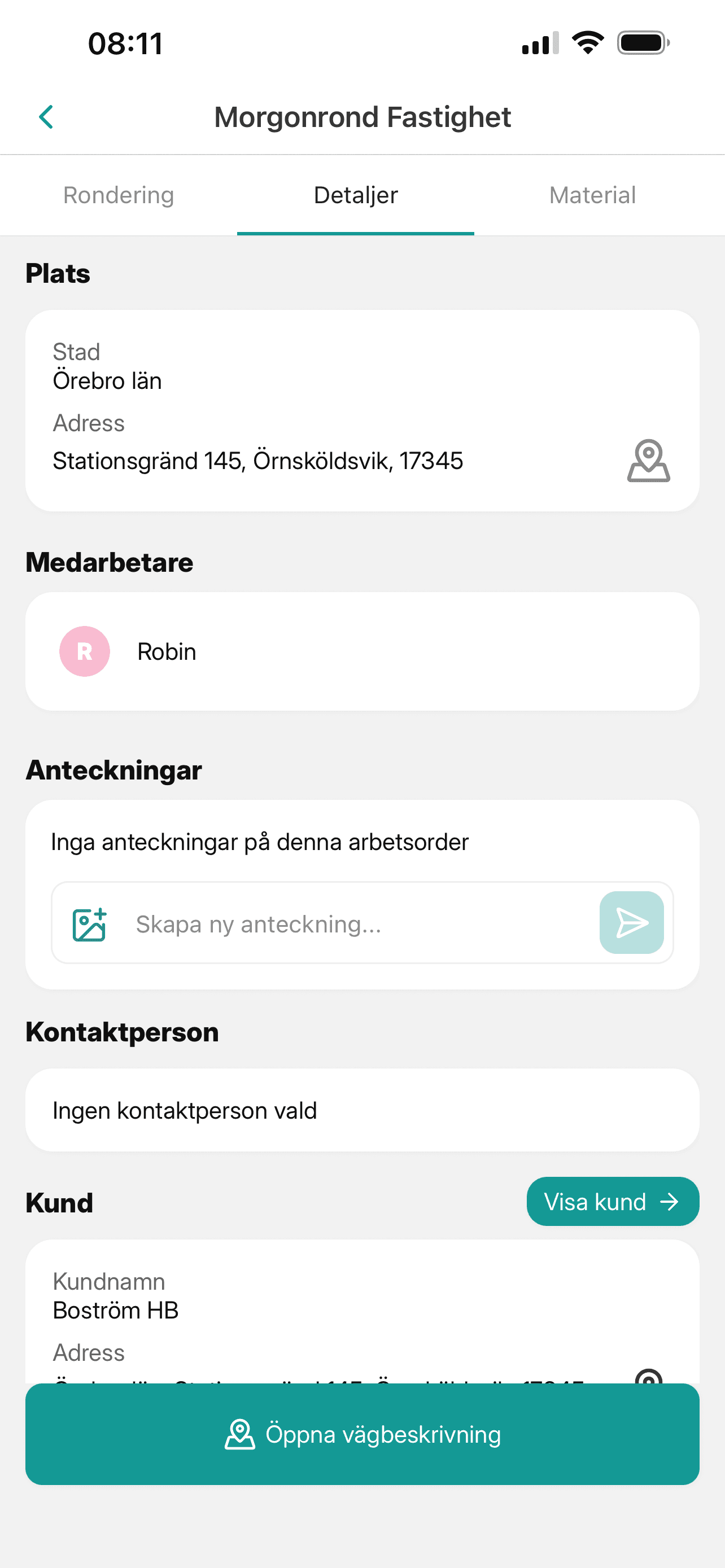
The worker sees the job in the app's agenda, opens directions and ticks off tasks on site, adding photos, notes, time and materials.
Follow up in the office
Task status shows in the web app while the job runs. When it is done you see who completed it and when, and can download the work order as a PDF.
Features that cut admin
Tasks with status
Each task has its own status, so you can see how far a job has got without calling.
Recurring work orders
Weekly cleaning or monthly visits are set up once, with the interval you need, such as every other week.
Photos and notes
Photos taken in the app are attached to the task. Notes can carry attachments and live on the job and on the client.
Materials from your article register
Materials are logged on the job from your article register with cost price, sales price and unit.
Price groups and fixed prices
Use different hourly rates for different kinds of work, or a fixed price per visit.
Built-in chat
Questions about a job go in the chat between office and field instead of private text threads.
Work orders on the phone, in sync with the office
The mobile app runs on iOS and Android. Changes made in the office appear on the worker's phone straight away, with a push notification for new and changed jobs, and whatever is reported on site appears in the web app just as quickly. The app and web app are available in Swedish and English, each user picks their own time zone, and the app needs an internet connection to sync.
From work order to invoice basis
An invoice basis collects what a client should be billed: hours worked, materials and fixed prices from completed jobs, for a period such as a month. Download it as a PDF and track its status: not sent, sent or paid.
Deviations from inspection rounds become work orders
With the inspection rounds add-on your staff carry out rounds with checklists on their phones. Each checkpoint is passed or failed, and a deviation gets a comment and a photo. When the round is finished you create a work order from it, with one task per deviation, ready to schedule and assign.
Built for your trade
Paper and spreadsheets compared with a work order system
| Situation | Paper and spreadsheets | Work order system |
|---|---|---|
| New order for a worker | Note, call or text message | The job appears in the app with a push notification |
| Changed time or address | Another note or text, and the old one may still be followed | The change shows in the app straight away |
| Recurring jobs | Written out again every time | Set up once with an interval |
| What has been done | Call and ask | Status per task in the web app |
| Time and materials | Timesheets copied by hand | Reported on the job in the app |
| Invoice basis | Pieced together from notes and spreadsheets | Collected from completed jobs, as a PDF |
What does a work order system cost?
OpSynk is in beta and has no public price list yet. Email support@opsynk.com or join the beta and we will tell you what applies to you. In general the price of a work order system depends on the number of users, which modules you need, any start-up fee or training, and the length of the commitment. You can try a demo in your browser first.
Frequently asked questions
What is a work order system?
It is a digital tool for creating, assigning and following up work orders. The office sets up the job with client, address and tasks, and the worker carries it out and reports on it from a phone. When the job is done, time, materials and photos are all on the order.
What does a work order system cost?
Price usually depends on the number of users, the modules you need and any start-up fee or commitment period. OpSynk is in beta and has no public price list yet. Email support@opsynk.com or join the beta to find out what applies to you.
Can we try it for free?
You can try OpSynk in a demo straight away in your browser. The demo opens an empty demo account where you add your own clients and work orders. File uploads and client import are switched off in the demo.
How are work orders linked to invoicing?
Time and materials reported on the work order, plus fixed prices per visit, are collected into an invoice basis for the client. You download it as a PDF and mark it not sent, sent or paid. The invoice itself is created in your accounting system, as OpSynk has no accounting integration today.
Does the app work on both Android and iOS?
Yes, the mobile app is available for Android and iOS. The office works in the web app, and changes sync between them in real time. The app needs an internet connection.
What Vift Fastighetsservice says about OpSynk
“OpSynk has streamlined our planning with smooth user scheduling and the ability to easily link time and materials to work orders. Everything is then transferred to the invoice without hassle. The ability to automatically create recurring events saves us both time and manual work. A user friendly system that truly makes our daily work easier.”
 Lucas, Vift Fastighetsserviceviftfast.se(opens in a new tab)
See a work order in practice
Open a demo in your browser and set up your first client and work order.